

It rewrites to your standard. You decide what stays.
Plenty of tools will generate requirements for you. In a regulated environment, that is the wrong product. ReqWriter rewrites requirements for clarity and quality, preserving intent and grounding every change in your standards. You review the rewrite, accept or reject it, and authorship of the requirement remains yours.
ReqWriter does not judge its own output. That is an architectural choice, not a gap: QVscribe evaluates every suggestion independently.
Four design decisions do the work most tools leave to the model.
Elsewhere, the model that drafts a change is often the model that approves it. Here, ReqWriter drafts, and the score that judges the draft comes from QVscribe, a deterministic engine that gives the same input the same score, every time. A model never grades its own work.
Every rewrite appears beside the original, with each change marked and its reason shown. The engineer accepts or rejects; until they do, the requirement is untouched. What entered your document is always something a person chose.
The rules come from your configuration, not from the model. Rewrites are steered toward EARS conformance and the conventions you have set, and terms you designate stay exactly as written. Controlled vocabulary stays controlled, even mid-rewrite.
An accepted rewrite enters the QRA Platform's record of change like any other edit. It is re-scored on entry, versioned by content, captured in snapshots, and visible in timelines. The platform holds that record. Ask us how, exactly →
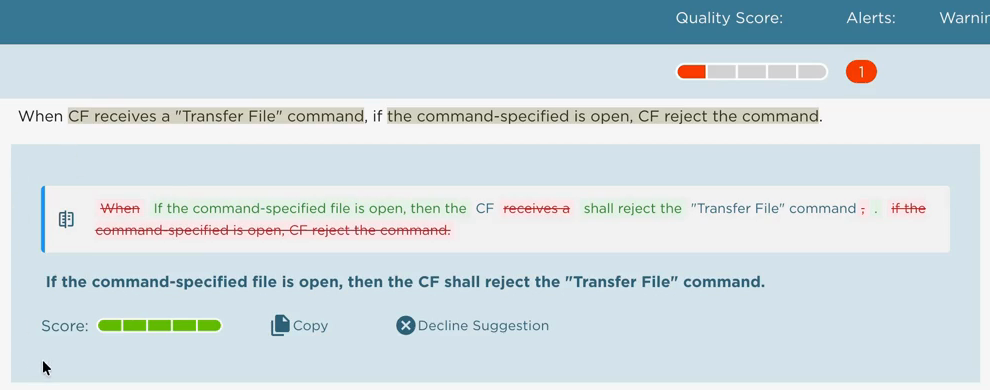
From flagged to fixed, in four moves.
QVscribe flags a requirement
A low score, with the exact words behind each finding highlighted. That is the trigger. ReqWriter starts from a diagnosed problem, not a blank page.
ReqWriter drafts a rewrite
A version rewritten toward your standard, including into EARS syntax. Run it on a single requirement or on a batch. Terms you specify are preserved exactly.
You compare, side by side
The rewrite sits underneath the original with every change marked, so you see precisely what would change before anything does.
Accept or reject, then re-scored
Accepted rewrites go back through QVscribe. The score that flagged the problem is the score that confirms the fix.
When the Mobile App User selects Intercom, the Control System shall turn on the Indoor Microphone and shall turn on the Outdoor Microphone.
When the Mobile App User selects Intercom, the Control System shall turn on the Indoor Microphone.
When the Mobile App User selects Intercom, the Control System shall turn on the Outdoor Microphone.
One compound requirement split into two verifiable ones. Nothing enters the document until you accept it.
In the flow of authoring, next to the analysis.
Word and Excel
In the QVscribe task pane. Analyze the document, review the rewrite beside the original, and apply what you accept without leaving the document.
Your requirements management platform
The same Chrome and Edge extension that overlays QVscribe analysis inside IBM DOORS Next, Siemens Polarion and Jama Connect. When you accept a rewrite, When you accept a rewrite, you apply it in your requirements management tool — the extension itself never writes to your system of record.
The web interface
Requirement editors with side-by-side review and score history, for work that does not start in a document or a platform.
A team that moves between surfaces keeps its standard. Going from Word to the extension inside your requirements platform changes where the requirement lives, not what it is written toward.
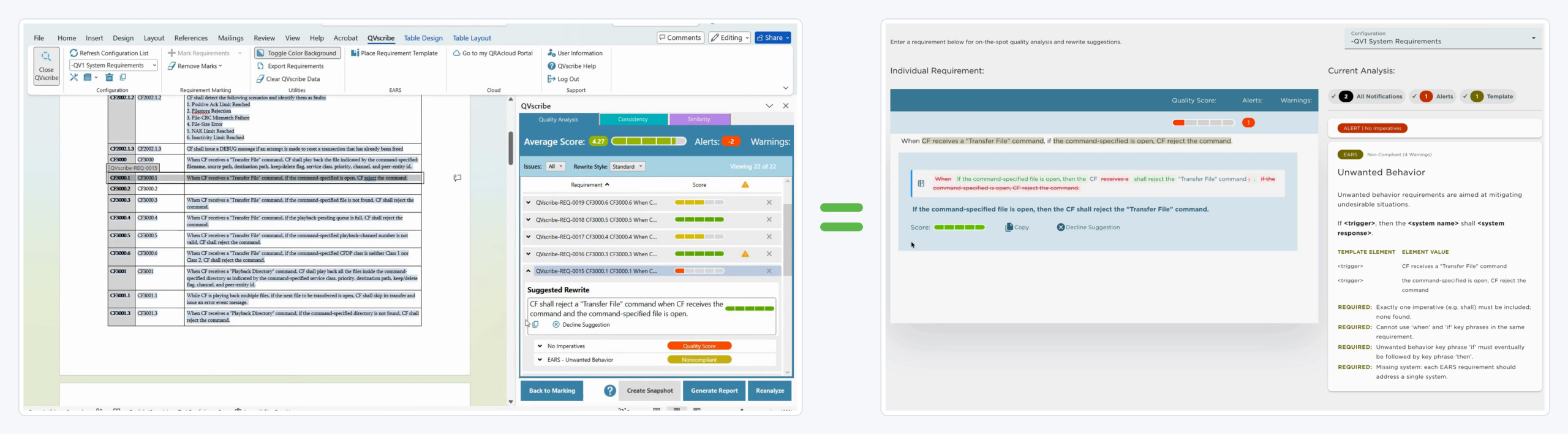
The two suggestions are not identical, and that is by design. ReqWriter drafts vary, and if one does not suit you, run it again for another. What does not vary is the judge: every draft is scored against the same configuration, so the score tells you whether the concern is gone.
Sync is read-only. When you accept a rewrite, the change is applied in the session, with your permissions.
Every rewrite is judged by something that did not write it.
QVscribe is the deterministic engine at the core of the platform. It scores a requirement as it is written, names the rule behind every finding, and maps that finding to the exact words that triggered it. The same input returns the same score, today and next year.
That judgment is what makes a rewrite worth reviewing at all. ReqWriter drafts against your configuration and QVscribe scores against the same one, so the engine that found the problem is the engine that confirms the fix.
What changed, and what standard was in force. The QRA Platform keeps the history.
Every accepted rewrite is captured with the requirement text before and after, the score at each point, the configuration version it was drafted and judged against, and the engine version behind both.
That gives you a record of why a requirement reads the way it does. Not only the current wording, but the change that produced it and the standard that applied when it was made. Snapshots build into timelines, so you can see how quality moved across a sprint, a program, or a portfolio.
Every environment is different. Book a call to see how the QRA Platform can fit in yours.
Why we build it in two halves.
A system that writes cannot also be the thing that certifies the writing. Not because the writing is poor, but because the check has no independence, and a check without independence is an opinion. We separate generation from evaluation so that every rewrite meets a judgment with no stake in it. The same separation runs through the permissions, where the person writing requirements is not the person who can change what counts as a good one. That is the Separation Principle, and it is why ReqWriter and QVscribe are two applications rather than one feature.
Common questions about ReqWriter.
The short answers.
Does ReqWriter replace the engineer?
No. ReqWriter uses AI to propose rewrites of existing engineering requirements. The engineer decides what stays, and authorship of the requirement remains theirs.
Does ReqWriter work in bulk or one requirement at a time?
ReqWriter supports document-level workflows with review and acceptance at the individual requirement level. When QVscribe analyzes a document, ReqWriter generates rewrites for the analyzed requirements. In Word and Excel, a rewrite is available from the flagged requirement’s dropdown; in your requirements platform, select a requirement to view its suggestion. An engineer reviews and decides whether to accept each rewrite.
Can ReqWriter handle domain-specific terminology?
Yes. ReqWriter uses your configuration, including your rules, approved glossary terms, and units, to guide rewrites. This helps suggestions reflect your organization’s terminology and requirements standards rather than relying on generic English.
Why do suggestions differ between runs?
ReqWriter uses generative AI, so suggested rewrites can vary between runs. If a draft doesn’t suit your needs, you can generate another. What remains consistent is the evaluation: QVscribe scores each draft against the same configuration, so engineers can check whether the identified problem has been addressed.
What stops a bad rewrite from slipping through?
QVscribe evaluates every rewrite suggestion independently before an engineer accepts it. The system that generates the rewrite is separate from the system that grades it, and the engineer decides whether to apply the change.
Which rewrite styles are available?
ReqWriter offers Standard and EARS rewrite styles. Standard focuses on improving clarity, testability, and consistency. EARS applies the Easy Approach to Requirements Syntax while improving requirements quality.
What happens when a rewrite is accepted?
When an engineer accepts a rewrite, the change is applied in their session and evaluated by QVscribe. The resulting record captures the updated requirement and the configuration used for evaluation, so the change can be traced back to the standard in force.
Bring a requirement you already know is weak.
A working session on your own document: your standard encoded as a configuration, your requirement flagged, rewritten, and re-scored in front of you.
The QRA Signal
Where Continuous Engineering Assurance goes next: new capabilities and the Requirements Operating Model as it releases, plus the chance to shape the roadmap, every two weeks. Not ready to talk? Start here.